Joining the NetGen Project: NING

Go to the Flat Classroom NING
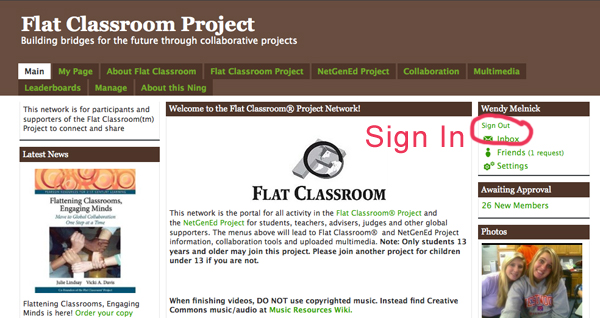
1. Sign up by clicking the SIGN UP words on the right hand side of the wiki. Create an account, using the following formula for the NAME area of the sign up window: JohnD_WSS (first name, last Capitalized initial, underscore, WSS). You must add this in the name area, as there is no option to create a login.
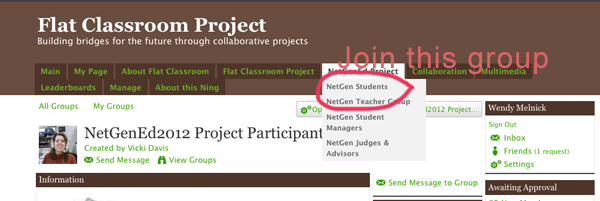
  2. Join the NetGenEd Student Group in the dropdown menu NetGenEd Project.

3. Update your profile page with your school information, an appropriate avatar image,  any interests that you would like to share with the group, etc. You will also create a welcome message either written or a short video.Do not upload any images that are not relevant to the project.

4. Friend all those in our class and those students on your Project Team – and me.
Analyzing the Horizon Report

Themes to be Discussed and Analyzed:

Time-to-Adoption Horizon: One Year or Less
1.Mobile Apps  PDF page 14 – 17 (as read by Adobe Reader or Acrobat)
2. Tablet Computing PDF page 18- 21
Time-to-Adoption Horizon: Two to Three Years
1.Game-Based Learning PDF page 22 – 25
2.Learning Analytics PDF page 26 – 29
Time-to-Adoption Horizon: Four to Five Years
1.Gesture-Based Computing PDF page 30 – 33
2.Internet of Things PDF page 34 – 37

Your Challenge

The Facts:

1. Define your technology.  2. What is it, how does it work, examples. 3. Summarize the overview. 4. What is the relevance for Teaching, Learning or Creative Inquiry. 5. Concrete examples of how this is used in practice, visit the various web sites, summarize what they are doing. 6. Report on at least one other finding in the “Further Readings” section.

Assess and Analyze:

7. Now Assess the technology: Engage the audience in 3 or 4 Socratic questions based on your findings. Consider how your generation will be using this technology when crafting your questions. Does this technology provide more freedom of choice? Does this technology allow for customization of its interface or use? Is information about this technology, its use and development accessible? How does it allow for collaboration?  Does it encourage or impede integrity? Is it fun? Is it fast? Are the companies behind this technology transparent, innovative?

Socratic Questioning:

1. Clarification: why do you say that? Could you explain further?
2. Assumptions: challenging the assumptions. Is this always the case?
3. Evidence as the basis of an argument: Is there reason to doubt this evidence?
4. Alternative viewpoints and perspectives: What is the counter argument? What is another point of view?
5. Implications and Consequences: what if this happened? What are the results of these actions?
6. Question the question: why is this question important? Which are the useful questions?

Timeline on ASM3M Calendar


Music Video Assignment 2012

Music Video Requirements:

Duration: 3 – 5 minutes including credits

Use one other  software program from this list:  Photoshop, Motion, After Effects

Any lip synching must be accurate

Production Logo: an original image reflective of the personality of your production group (not taken off the internet)

Song: lyrics must be pre-approved. No swearing or inappropriate sexual references or anything that is culturally/racially insensitive or violent allowed.

Credits must include all actors, the song used, camera man, editors. They must be easy to read.

Maximum 4 group members. You may hire as many actors as you want, from this class or your friends. If you need someone during class time from another class, please get that teacher’s permission (I can write a note to that teacher). You can also borrow the camera over-night and on the week-end.

You must use a tri-pod. Shaky camera work will result in lost marks.

Make sure your footage is not blurry, blown out by too much light or hard to see for lack of light.

Remember all films made for Westdale are free of violence, weapons of any kind (guns, knives etc), sexually explicit images, culturally/racially insensitive material, drug use, alcohol, humiliation or mocking behaviour.


Interfaces: Final Cut

Your new challenge:

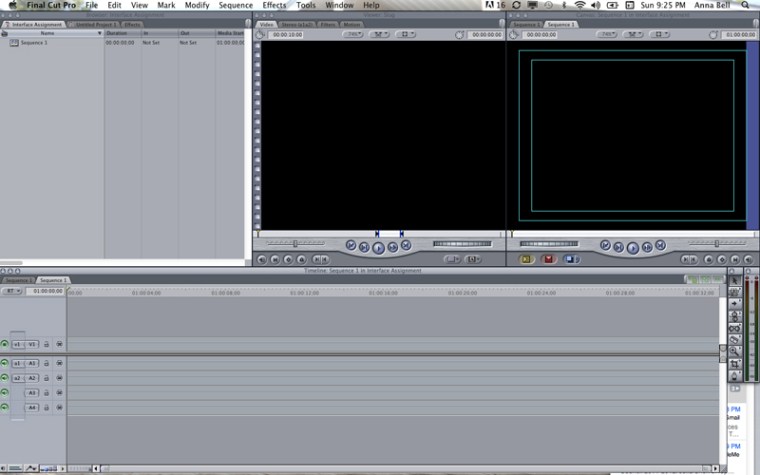
Create a 2 – 3 minute film that demonstrates that you know and understand the following elements of the Final Cut Interface. Define each one, show where they are located in the interface and demonstrate what each one does or how to use it. Give a tip on  what not to do or what you should be doing with it. You may use narration, animation, graphics, images, film footage, green screen etc.

Browser

Viewer

Canvas

Timeline

Sequence

Tool Palette

Filters

Tracks: video and audio

Effects

Wireframe

Title safe area

Key

Mark In, Mark Out,

Add Motion Keyframe

Marker

layering

Opacity

Razorblade tool

Pen tool

Commenting

Post a comment on this blog on an essay or in the forum. You must comment appropriate to the writing that you are commenting on: positive comment about what you like about the writing, your opinion about the issue being discussed, or your personal reflection about the topic. Your comment must be at least 100 words.